Scene 1 (0s)
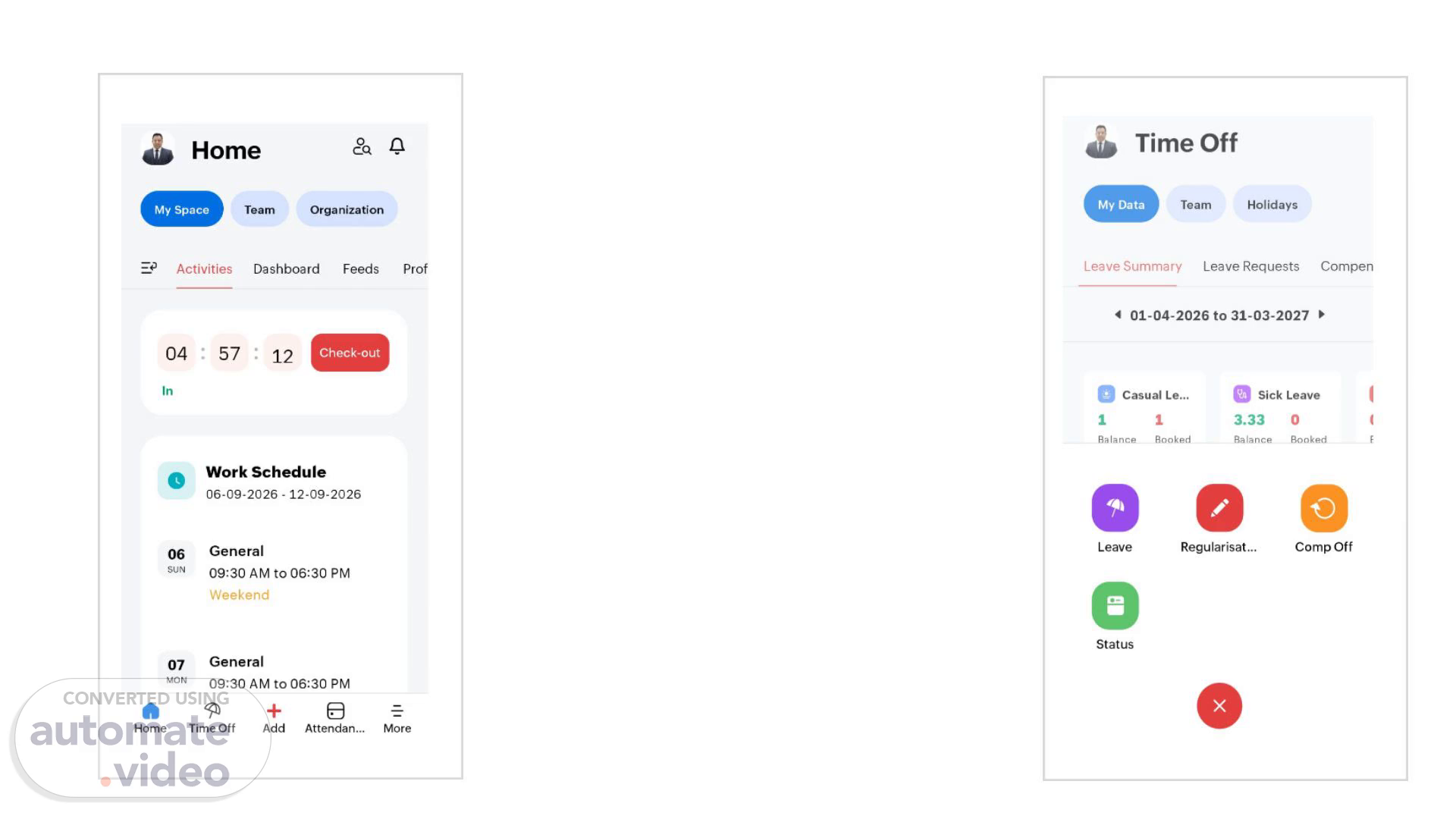
Home My Space Activities 57 Tea m Organization Dashboard 12 Feeds Check-out In 06 SUN 07 Home Work Schedule 06-09-2026 - 12-09-2026 General 09:30 AM to 06:30 PM Weekend General 09:30 AM to 06:30 PM 9 Time Off Add Attendan... Prof More.
Scene 2 (25s)
[Audio] The employee can choose from various types of leaves such as sick leave, annual leave, maternity leave, paternity leave, casual leave, and more. The employee must select one type of leave that they wish to take. The system will then display their current leave balance. The employee can then select specific dates for which they want to take the leave. The system will also allow them to mark whether the leave is for a full day or half day. The employee should check the total amount of leave available for the chosen dates. The employee may need to enter a team email address if required. The employee should provide a valid reason for taking the leave. The employee must confirm their mobile and email access during the leave period. Finally, the employee taps submit to complete the application process..
Scene 3 (1m 13s)
[Audio] The system requires that you confirm the application for leave has been successful. To do this, tap yes on the screen. This action confirms that your leave application has been successfully submitted and is now pending review by your manager. The manager will then review the leave request and update its status to approved once they have confirmed it. You will be notified via email and within the Zoho app when the status is updated. Clicking yes confirms the application and allows the system to proceed with the next steps..
Scene 4 (1m 47s)
[Audio] The manager reviews the employee's leave request, taking into account the type of leave, dates, reason, and access preferences. If the manager approves the request, they provide a written confirmation to the employee via the company app. This confirmation includes the manager's name, the approved leave dates, and any additional comments. The status of the leave request is updated to "Approved". The process for requesting sick leave and privilege leave is similar, with the leave type being adjusted according to the employee's selection in step 2. The manager may reject the leave request if it does not meet certain criteria, such as insufficient notice or conflicting work schedules. In this case, the manager provides a written explanation for the rejection. The employee must then resubmit their leave request, addressing the issues raised by the manager. The manager also has the leave request reviewed by other team members, who may have specific knowledge about the employee's work schedule or availability. This review helps ensure that the leave request aligns with the company's policies and procedures. The manager may also use the system to track the employee's leave history, including the number of days taken off and the total amount of leave available. This information can be used to make informed decisions about future leave requests. The manager uses the system to communicate with employees regarding leave requests, including sending notifications when a request is approved or rejected. The manager can also use the system to monitor the overall leave usage within the company, identifying trends and patterns in leave requests. This information can be used to optimize the company's leave policies and procedures. The manager can adjust the leave policy to accommodate different types of leave, such as vacation time, sick leave, and privilege leave. The manager can also set up alerts and notifications for employees when their leave request is approved or rejected. The manager can use the system to generate reports on leave usage and trends, helping to identify areas where the company can improve its leave policies and procedures. The manager can also use the system to track employee engagement and satisfaction with the leave policies and procedures. The manager can adjust the leave policy to accommodate different types of leave, such as vacation time, sick leave, and privilege leave. The manager can also set up alerts and notifications for employees when their leave request is approved or rejected. The manager can use the system to generate reports on leave usage and trends, helping to identify areas where the company can improve its leave policies and procedures. The manager can also use the system to track employee engagement and satisfaction with the leave policies and procedures. The manager can adjust the leave policy to accommodate different types of leave, such as vacation time, sick leave, and privilege leave. The manager can also set up alerts and notifications for employees when their leave request is approved or rejected. The manager can use the system to generate reports on leave usage and trends, helping to identify areas where the company can improve its leave policies and procedures. The manager can also use the system to track employee engagement and satisfaction with the leave policies and procedures. The manager can adjust the leave policy to accommodate different types of leave, such as vacation time, sick leave, and privilege leave. The manager can also set up alerts and notifications for employees when their leave request is approved or rejected. The manager can use the system to generate reports on leave usage and trends, helping to identify areas where the company can improve.