Scene 1 (0s)
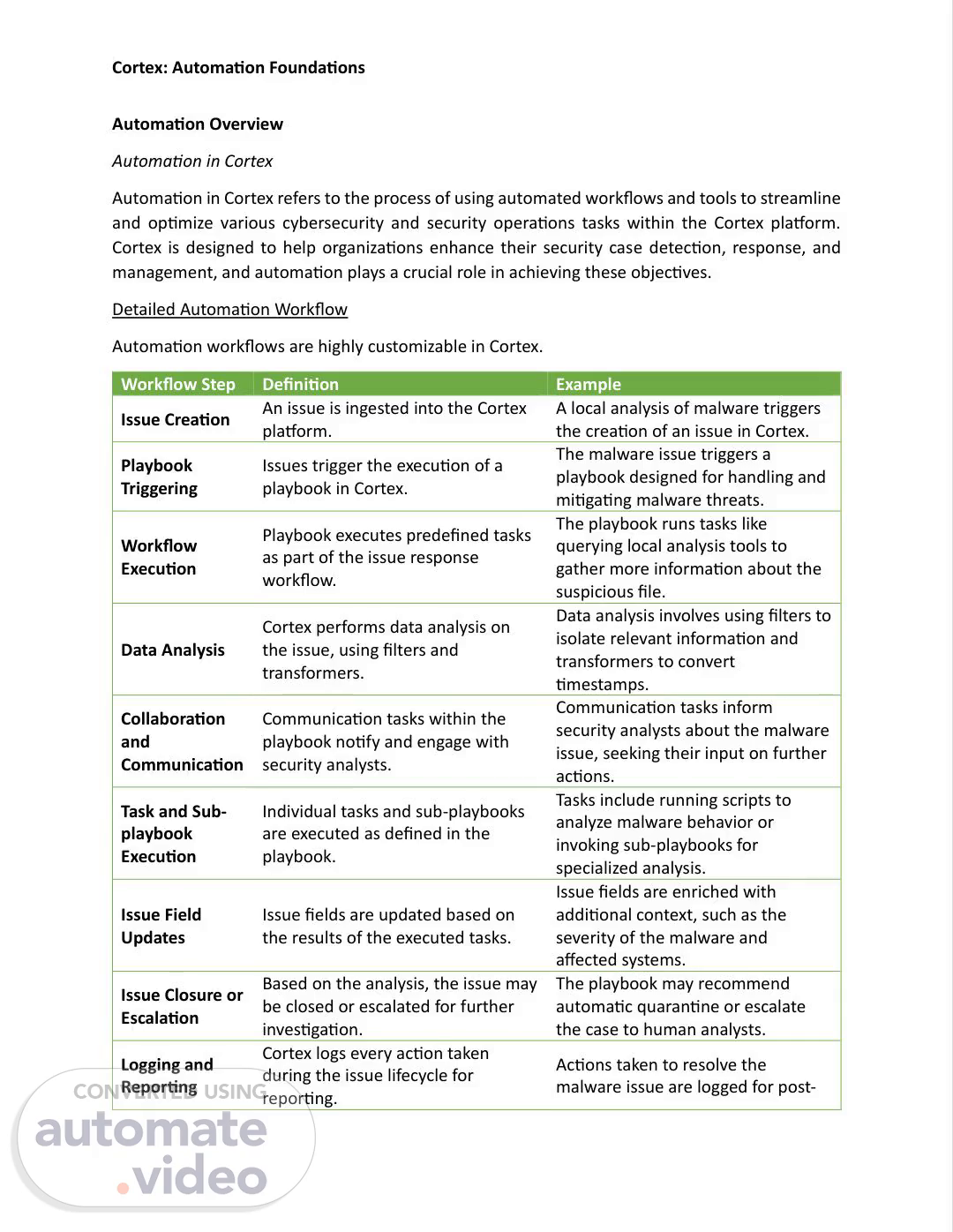
[Audio] Cortex: Automation Foundations Automation Overview Automation in Cortex Automation in Cortex refers to the process of using automated workflows and tools to streamline and optimize various cybersecurity and security operations tasks within the Cortex platform. Cortex is designed to help organizations enhance their security case detection, response, and management, and automation plays a crucial role in achieving these objectives. Detailed Automation Workflow Automation workflows are highly customizable in Cortex. Workflow Step Definition Example Issue Creation An issue is ingested into the Cortex platform. A local analysis of malware triggers the creation of an issue in Cortex. Playbook Triggering Issues trigger the execution of a playbook in Cortex. The malware issue triggers a playbook designed for handling and mitigating malware threats. Workflow Execution Playbook executes predefined tasks as part of the issue response workflow. The playbook runs tasks like querying local analysis tools to gather more information about the suspicious file. Data Analysis Cortex performs data analysis on the issue, using filters and transformers. Data analysis involves using filters to isolate relevant information and transformers to convert timestamps. Collaboration and Communication Communication tasks within the playbook notify and engage with security analysts. Communication tasks inform security analysts about the malware issue, seeking their input on further actions. Task and Subplaybook Execution Individual tasks and sub-playbooks are executed as defined in the playbook. Tasks include running scripts to analyze malware behavior or invoking sub-playbooks for specialized analysis. Issue Field Updates Issue fields are updated based on the results of the executed tasks. Issue fields are enriched with additional context, such as the severity of the malware and affected systems. Issue Closure or Escalation Based on the analysis, the issue may be closed or escalated for further investigation. The playbook may recommend automatic quarantine or escalate the case to human analysts. Logging and Reporting Actions taken to resolve the malware issue are logged for postCortex logs every action taken during the issue lifecycle for reporting..
Scene 2 (3m 7s)
[Audio] Cortex: Automation Foundations case reports and compliance documentation. Post-Case Analysis Cortex continues to analyze data post-issue for patterns and updates to threat intelligence. Post-issue analysis helps identify patterns in malware behavior, contributing to threat intelligence updates. Automation Components The following key components are essential for implementing automation in Cortex. Marketplace The Marketplace is a one-stop destination for enhancing the capabilities of security operations. A wide range of content, including playbooks, integrations, asset types, and more, can be seamlessly installed, deleted, and updated. Playbooks Playbooks are the core automation engine within Cortex, orchestrating a sequence of tasks, conditions, automations, commands, and loops to streamline and enhance investigation and response processes. This orchestration significantly reduces investigation time. Filters and Transformers In Cortex, data manipulation is crucial for effective case response. Filters and transformers play a pivotal role in this process by allowing users to extract, manipulate, and present data in JSON format. Scripts Scripts within Cortex serve as potent tools for executing specific actions through commands. The Importance of Automation in Cortex Automation in Cortex offers a wide range of benefits for organizations looking to enhance their security case management and response capabilities. Some key benefits of automation include: Rapid Case Response Automation allows for real-time detection and immediate response to security cases, reducing the impact and potential damage caused by cyber threats. Consistency Automated workflows ensure that case handling procedures are executed consistently, reducing the risk of human error and ensuring compliance with security policies and best practices..
Scene 3 (5m 36s)
[Audio] Cortex: Automation Foundations Improved Efficiency Automation streamlines routine and repetitive tasks, enabling security teams to focus on more complex and strategic activities, ultimately increasing the overall efficiency of security operations. Scalability As organizations grow or face increased security threats, automation enables security operations to scale effectively without the need for a linear increase in human resources. Reduction of Issue Fatigue Automation can help reduce issue fatigue by automating the initial triage and categorization of security issues, allowing security analysts to prioritize high-priority cases. Resolution/Closure Automation can help facilitate the rapid resolution of security cases, swiftly identifying and addressing potential threats in real-time. Cortex Marketplace Marketplace in Cortex The Cortex Marketplace is the central hub for managing content packs, which enhance security operations with content such as playbooks, integrations, scripts, and more. It also helps optimize case and asset management. The Cortex Marketplace functions differently depending on the product. The features and capabilities can be found in the table below: Features and Capabilities by Product Lite Experience Full Experience Product Cortex Cloud or Cortex XDR Cortex XSIAM Capabilities Browse and install content packs Manage installed content packs from adopted playbooks or configured scripts/actions in a playbook Integrations Scripts Playbooks Reports Dashboards ✖ Rules (Correlation, Data Models, and Parsing) Issue Types, Fields, and Layouts ✖.
Scene 4 (7m 44s)
[Audio] Cortex: Automation Foundations Classifiers and Mappers ✖ Indicator Types, and Indicator Fields ✖ The image illustrates the full Cortex Marketplace experience, which includes a Browse tab for installing content packs. This tab is not available for Cortex Cloud or Cortex XDR. Click the image to enlarge it. Content Pack Features Cortex provides the full potential of automation through a rich set of features that empower organizations to fortify their security posture and streamline case management. Marketplace Content Pack features include integrations, playbooks, issue types, issue fields, scripts, correlation rules, data model rules, parsing rules, dashboards, and reports. Integrations Integrations connect third-party security and alert management platforms to Cortex. This connection enables these platforms to trigger events, which are then transformed into issues within Cortex, initiating automated security processes. Benefits.
Scene 5 (9m 0s)
[Audio] Cortex: Automation Foundations Integrations streamline the flow of information, enabling the ingestion of issues from various external sources. This consolidation of data sources ensures a comprehensive view of the security landscape. Key Aspects Cortex offers the ability to define both security orchestration, automation, and response (SOAR) integrations for automation and Collection integrations for gathering raw event data, providing versatility in automation, threat detection, and data collection. Playbooks and Scripts In Cortex, playbooks efficiently automate case handling, minimizing response times and ensuring consistency, while scripts provide customized automation tailored to organizational requirements. Playbooks Playbook and script processes are traditionally handled manually, but playbooks automate them efficiently. Benefits: Playbooks reduce the need for manual intervention, minimizing response times and ensuring consistency in case handling. They address issues with data from various systems, providing comprehensive insights for analysis. Key Aspects: Playbooks are triggered by ingested issues, enabling the definition of a sequence of actions for specific case types. They offer adaptability and resource allocation optimization..
Scene 6 (10m 40s)
[Audio] Cortex: Automation Foundations Scripts Scripts are composed of a series of commands that can be employed in playbook tasks and when running commands in the issue War Room. Benefits: Scripts automate manual tasks, enhancing the efficiency of case response, and ensuring consistent actions are taken during each case. Key Aspects: Scripts are fundamental for creating customized automation tailored to an organization's specific requirements. Issue Types and Fields Issue types are essential for categorizing and prioritizing issues within Cortex. Issue fields provide detailed information about each issue. Issue Types Issue types serve as the first step in classifying issues, determining the most suitable response and actions for each issue. Benefits: Issue types facilitate systematic issue classification, allowing for efficient response strategies based on the nature and severity of each issue. Key Aspects: Each issue type corresponds to a specific set of issue fields, ensuring the association of relevant information with each issue, thus supporting accurate analysis and response..
Scene 7 (12m 5s)
[Audio] Cortex: Automation Foundations Issue Fields Issue fields provide detailed information about each issue, capturing specific data relevant to the corresponding issue type. Benefits: Issue fields ensure that issue data is structured, organized, and easily accessible for analysis and response. Key Aspects: Issue fields are customizable, accommodating pertinent information unique to security operations. Rules Rules in Marketplace allow for the automation of potential threats as well as normalize and process incoming data. Rules Rules in Marketplace allow for the automation of potential threats as well as normalize and process incoming data. Correlation Rules Correlation Rules analyze multiple events from various sources using the XQL-based engine within Cortex. These rules automate the detection of potential threats, reducing reliance on manual analysis..
Scene 8 (13m 15s)
[Audio] Cortex: Automation Foundations Benefits: Correlation Rules facilitate the detection of complex, multi-event patterns that may indicate security cases. They trigger issues based on predefined conditions, enhancing threat detection. Key Aspects: Correlation Rules are scheduled and utilize the XQL engine, allowing for rulebased threat detection. Data Model Rules Data Model Rules play a pivotal role in data normalization and enrichment. They allow the creation of a standardized schema with predefined data types and the mapping of third-party data to this schema. Benefits: Data Model Rules simplify the management and analysis of diverse data sources, ensuring consistent data representation. Key Aspects: Data Model Rules are essential for making data from various sources easily consumable and consistent in format. Parsing Rules Parsing Rules enable the preprocessing of incoming data, allowing for the removal of unnecessary information, data quality improvement, and storage optimization. Benefits: Parsing Rules reduce data storage costs, enhance data quality, and streamline data analysis processes. Key Aspects: Parsing Rules ensure that incoming data is clean and prepared for analysis, increasing the effectiveness of security operations..
Scene 9 (14m 58s)
[Audio] Cortex: Automation Foundations Dashboards and Reports Cortex provides features to view and analyze data, including Dashboards and Reports. Dashboards Dashboards provide a visual representation of data, offering real-time monitoring and analysis of key metrics and insights. Benefits: Dashboards consolidate the view of security operations, enabling prompt decisionmaking and enhancing situational awareness. Key Aspects: Customizable widgets within dashboards allow users to tailor the presentation of data according to specific needs. Reports Reports contain statistical data presented in widget format, allowing for the extraction of insights and analytics for sharing with stakeholders. Benefits: Reports facilitate data-driven decision-making and the communication of security insights to relevant parties. Key Aspects: Reports are derived from dashboards, providing a convenient means to extract and share key findings..
Scene 10 (16m 16s)
[Audio] Cortex: Automation Foundations Content Pack Management Within the Marketplace, users can seamlessly explore, install, and manage content packs comprising playbooks, integrations, and asset types. Key aspects of content pack management include: Search and Navigate Within the Marketplace, users can install, delete, and update content while fine-tuning searches for specific elements through intuitive filtering options. Whether in pursuit of high-level use cases, integrations, content pack categories, or certified and user-supported resources, the Marketplace equips individuals with the tools to streamline their search for the right solutions. Updates Content packs undergo regular updates to address bugs, introduce enhancements, and refine their functionality. Users receive notifications in the Installed Content Packs tab, keeping them informed about the latest developments. The Marketplace itself undergoes updates every two hours to maintain currency. Updates are not installed automatically; Cortex administrators need to manually select and initiate the update process, providing them with control over content update preferences. Version History The Version History tab provides a comprehensive view of the installed version, earlier iterations, and available updates for a specific content pack. This feature allows users to revert to a previous version if necessary, ensuring flexibility in managing content..
Scene 11 (18m 12s)
[Audio] Cortex: Automation Foundations Dependencies Dependencies play a pivotal role in Cortex. Various objects, such as playbooks and issues, may exhibit interdependence. During the installation process, mandatory dependencies, including required content packs, are automatically incorporated. Optional dependencies, such as certain content packs, can be selectively managed in the Cart. Content Pack Installation Before installing a content pack, users are encouraged to thoroughly review pertinent details. This includes an examination of the content itself, associated dependencies, version history, and any available user reviews. Once satisfied, users proceed to install the content pack, initiating its inclusion in the Cart for streamlined management..
Scene 12 (19m 10s)
[Audio] Cortex: Automation Foundations Deletion Deleting a content pack is a significant action, resulting in the removal of all associated content, including detached and customized elements. Caution is advised, especially if other packs are dependent on the content pack slated for deletion. Update Content Packs When updates become available, users can seamlessly transition to the latest version of a content pack. Customizations made by users are automatically integrated into the update, ensuring a cohesive experience. All dependent content packs are updated in tandem..
Scene 13 (19m 57s)
[Audio] Cortex: Automation Foundations Reverting The ability to revert to an earlier version provides users with a valuable option. However, it's essential to exercise caution, particularly regarding potential impacts on dependent content. This feature offers flexibility while maintaining a balance between innovation and stability. Playbooks Overview Playbooks in Cortex Playbooks serve as the core automation engine within the Cortex system, orchestrating a sequence of tasks, conditions, automations, commands, and loops. The primary purpose of playbooks is to streamline and enhance the efficiency of investigations and response processes, contributing significantly to time savings. Playbooks enable users to automate diverse security processes, from managing investigations to ticket handling. Playbooks and the Issue Lifecycle Playbooks come into play during the investigation and response phase of the issue lifecycle. However, their logical flow is defined during the initial planning stage, aligning with the design of the use case. Creating or updating playbooks involves addressing key considerations, including.
Scene 14 (21m 21s)
[Audio] Cortex: Automation Foundations required actions, conditions, looping, time sensitivity, and criteria for considering an issue as remediated. Step 1: Investigation and Response Define logical flow of the investigation during the initial planning stage. Step 2: Design Use Case During this step, key considerations include required actions, conditions, looping, time sensitivity, and remediation criteria. Step 3: Create an Update Playbook Lifecycle Involve continuous refinement based on issue characteristics. Step 4: Issue Handling Ensure playbooks align with the design of specific use cases for optimal efficiency. Step 5: Define Logical Flow During the planning stage, establish logical flow to set the foundation for playbook execution. Step 6: Remediation Criteria Incorporate time-sensitive elements to streamline issue resolution. Step 7: Continuous Improvement Evolve playbooks based on changing threat landscapes and issue characteristics. Address critical aspects to tailor playbooks for effective issue response with actions, conditions, and looping. Playbook Development Playbooks are a series of tasks, conditions, automations, conditions, commands, and loops that run in a predefined flow to save time and improve the efficiency and results of the investigation and response process. They are at the heart of the Cortex system because they enable the automation of many security processes, including handling investigations and managing tickets. Security responses that were previously handled manually can also be structured and automated. For example, a playbook task can parse the information in an issue, whether it is an email or a PDF attachment. Playbook Types Playbooks encompass different task types, each designed for specific actions. Manual Tasks Manual tasks involve human intervention for confirmation or escalation..
Scene 15 (23m 52s)
[Audio] Cortex: Automation Foundations Conditional Tasks Conditional tasks validate conditions based on parameters, steering the playbook workflow accordingly. Communication Tasks Communication tasks facilitate interaction with users. Automation Tasks Automation tasks automatically remediate issues by engaging third-party integrations, ticketing systems, or file detonation using a sandbox. Best Practices Best practices for optimal playbook performance include using quiet mode, limiting indicator extraction, breaking up large playbooks into sub-playbooks, updating scripts to their most current version, and removing unused playbook tasks. These practices contribute to the efficiency and effectiveness of playbooks within Cortex. Scripts Scripts in Cortex Scripts within Cortex serve as potent tools executing specific actions through commands. These scripts, found in the Investigation & Response > Automation > Scripts page, are written in JavaScript, Python, or PowerShell and provide access to Cortex application programming interfaces (APIs), including those for issues, investigations, and the War Room. For enhanced security, they can be password-protected and can receive and access arguments for increased flexibility..
Scene 16 (25m 29s)
[Audio] Cortex: Automation Foundations Script Management Script detachment and attachment are key functionalities. When installed from a content pack, a script is attached by default, making it uneditable. To modify a script, users can detach it or create a duplicate. However, detaching a script from its Marketplace Content Pack prevents it from receiving updates. Alternatively, scripts can be easily enabled or disabled in the settings without requiring detachment or duplication. Script Search and Settings To efficiently retrieve a script, use the free-text search in the Scripts Library, identifying it by name or tag. Once selected, the Script Settings panel allows configuration of basic information such as name, language type, and description, as well as advanced settings like the timeout, Docker image name, and whether it runs on a separate container. Leverging Out-of-the-Box Scripts Cortex provides out-of-the-box scripts for use in playbooks and commands, primarily within the Base and Common Scripts content packs. Leveraging these common scripts offers reusable functions and variables across scripts and integrations, enhancing API capabilities. For example, CommonServerPython includes over 400 Python functions. These scripts contribute to the versatility of the scripting environment within Cortex..