Scene 1 (0s)
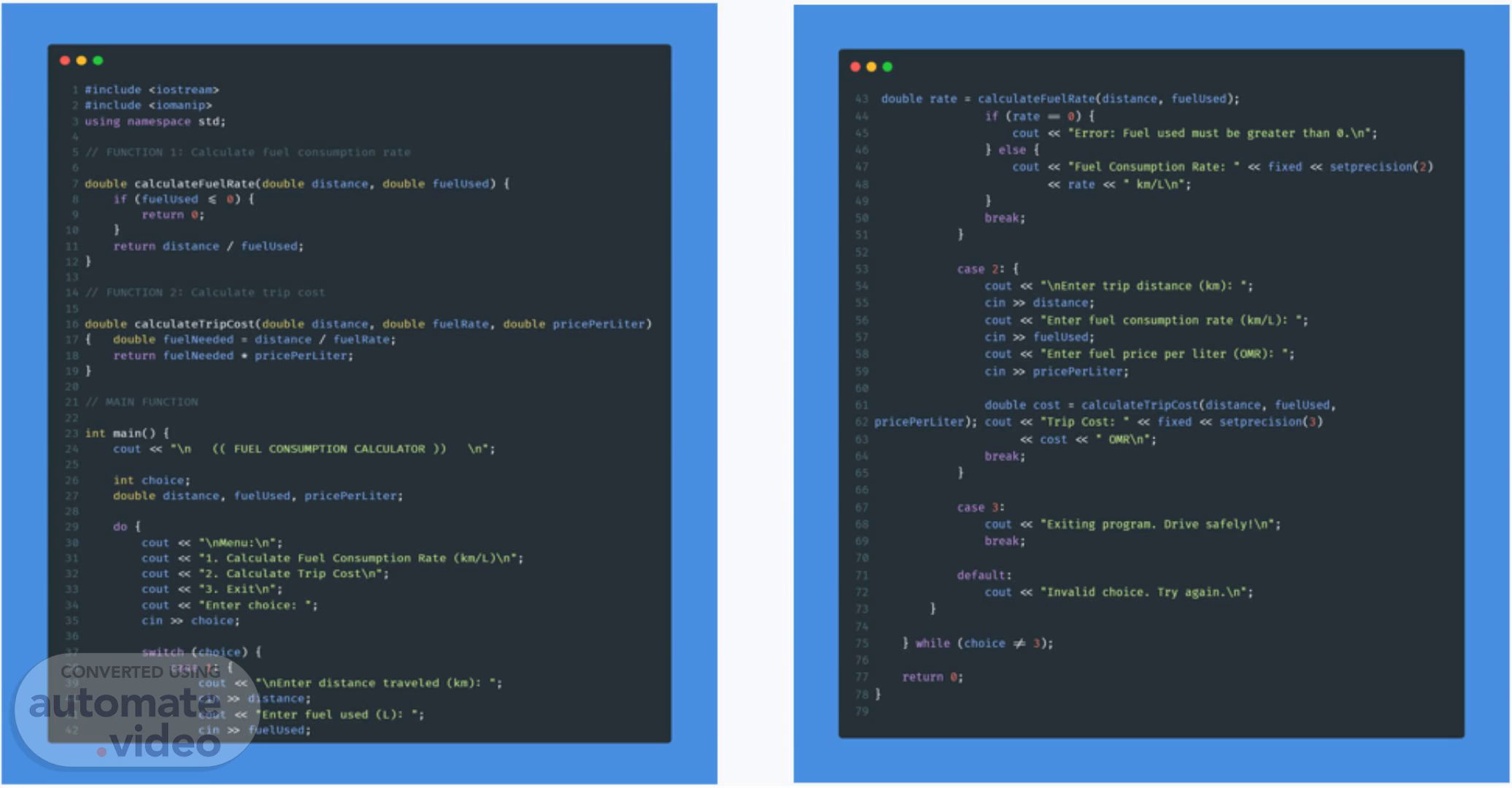
t *include < iostrean» *include using namespace Std; eovbte calculatevuetgate«ovble return o; return distance / fuetused; doubte calculatetripcost(dovble double rate calculateFuelRate(distance. fuelused); distance. distance. double double fuerused) fuergate. (rate cout ) else ( cout break ; cout •Error: Fuet used oust be greater than e. Nn • ; : • fixed setprecision(2) •suet consu•pticn gate rate « • •SnEnter trip distamce • ' double pricePerti ter) double fue1NeeOed • distance / f ver Rate; return fuetNeeeed • pricePerLiter; v pncepertiter); int nain() COUt • Nn int choice; FUEL COWAPTION CALCULATOR cin distance; cout •Enter Cuet consu.ption rate (knit): • Cin fuelused; cout •enter fuel price per titer • ; cin pricePerLiter; double cost • calculaternpcost(distance. foetused. cout •vriP Cost: • fixed setpreciston(3) cost • tm•sn•; break; doubte distance. luetused, prtcePerLiter; do cout « cout « cout cout cout •t. Calculate • 2. Calculate Trip •3. EXit\n•; •tnter choice: • Consunpt i on Cost Xn' ; Rate case 3: cout break; default: cout •Exiting progran. •Invalid choice. oriv• safetyt\n•; try againe\n•; cin choice; switch (choice) case 1 : cout •xnfnter distance traveled (En): • Cin distance; cout •enter fuel used • fuel used; ) shite (choice J); return e;.
Scene 2 (33s)
Simple Explanation of Our Code Part 1: Headers (The Tools We Need) cpp Copy Download #include <iostream> #include using namespace std; // This gives us gü/cout for input/output // This helps us format numbers nicely // So we don 't have to write "std: : " everywhere Why: Just like you need different tools to build something, our code needs these "tools" to work properly..
Scene 3 (52s)
Part 2: cpp Copy Download Function 1 - Fuel Rate Calculator double distance, if (fuelUsed <= double fy.eAU*é) { return return distance What it does: fuellJsed • • Takes: distance (how many km you drove) and fuelUsed (how many liters you used) Safety check: If fuel used is 0 or negative returns 0 (to avoid math errors) Calculation: distance + fuelUsed = km per liter Example: 200 km + 15 liters = 13.33 km/L.
Scene 4 (1m 10s)
Part 3: Function 2 - Trip Cost Calculator cpp Copy Download double distance, double fuelRate double double fuelNeeded return fuelNeeded What it does: - distance / fuelRate• • Takes: distance (trip length), fuelRate (car's efficiency), price) Step 1: distance + fuelRate = liters needed for trip Step 2: liters needed x = total cost Example: 150 km trip + 12 km/L = 12.5 liters needed x 0.250 OMR = 3.125 OMR.
Scene 5 (1m 29s)
Part 4: Main Program - Starting Point cpp Copy Download int mæ() { // Everything runs from here // Program ends here return e; Why: Every C++ program starts at main(). It's like the "front door" of our program..
Scene 6 (1m 41s)
Part 5: Variables (Memory Boxes) cpp Copy Download int choice; double distance; double fuellJsed• double // Stores menu choice (1, 2, or 3) // Stores km (can have decimals) // Stores Liters (can have decimals) // Stores price (can have decimals) Why variables: Like labeled boxes to store information. We put numbers in them, then use them later..
Scene 7 (1m 59s)
Part 6: The Menu Loop (Keep Showing Until Exit) cpp Copy Download do while (choice != 3); How it works: First time: Shows menu automatically (do...) 2. Process: User chooses option 3. Check: If choice is NOT 3 go back to step 1 4. If choice IS 3 -+ exit loop, end program Why do-while: SQ menu shows at least once, even if user wants to exit immediately..
Scene 8 (2m 21s)
Part 7: Switch Statement (The Choice Handler) cpp Copy Download switch case 1: // Do fuel rate calculation break; // Stop here, don't check other cases case 2: // Do trip cost calculation break; case 3: // Say goodbye and exit break; // If choice is not 1, 2, or 3 default : << "Invalid choice. Try again. cout How it works: Like a food menu - you pick number 1, you get the first item. You pick number 2, you get the second item..
Scene 9 (2m 44s)
Part 8: Getting User Input cpp Copy Download << "Enter distance traveled (km): " cout cin distance How it works: // Ask the question // Store answer in 'distance ' box • • • cout —Y Shows message to user (Output) cin Takes what user types and saves it (Input) Just like having a conversation with the computer.
Scene 10 (2m 59s)
Part 9: Formatting Numbers Nicely cpp Copy Download fixed << << rate cout What it does: • • • fixed Don't use scientific notation (like 1.2e+02) set recision 2) -+ Show only 2 decimal places Example: 12.34567 becomes 12.35 (rounded) Why: Money and rates look better with 2-3 decimals, not 10!.
Scene 11 (3m 14s)
Part 10: Error Checking cpp Copy Download if (rate << "Error: Fuel used must be greater than e. \n"; cout Why: If someone enters 0 or negative for fuel used, our calculation would break (can't divide by zero!). So, we check and show a helpful error message..
Scene 12 (3m 29s)
Part 11: Special Words in Code cpp Copy Download // "Stop here, don 't check anything else" break; return e; // "Program finished successfully " Break: After finishing a case in switch, stop and go back to menu Return O: Tell the computer "Everything worked, we're done now".